Create a Panel
A panel is what shows up in Discord, the panel will have a button where the user can create a ticket from.
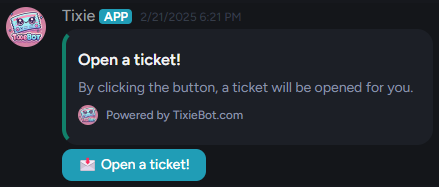
A panel consists of a embeded message and a button. The embeded messages consists of:
- Title
- Content
- Footer
- Color
Auto reply message
This is the message that automatically gets send within the ticket channel after a user opens a ticket. Placeholders can be used here.
Button style
There are four different button styles you can use these styles decide what color the button gets:
- Blue
- Red
- Green
- Gray
Name scheme
The format of the ticket discord channel names.
- #ticket-username
- #ticket-1 The number is the total amount of tickets within the guild.
Form
Here you can pick one of your already created forms. Once the user clicks the button on the panel to create a message this is the form the user will have to fill in.
Panel footer
By default the footer in the embedded message will say "Powered by tixiebot.com". The data you fill in, in this input field will replace that.
Panel color
The color of the embedded message.